annomate
annomate is an MCP server for VIA v3. It serves the VIA image annotator at a localhost URL, syncs annotations to a local store, and exposes a suite of MCP tools so Claude can read, add, edit, and delete regions in real time alongside the user.
It is the perceptual counterpart to jscad-mcp. Where jscad-mcp closes the loop by letting Claude render and look at what it built, annomate closes the loop by letting Claude commit coordinates and look at what it sees. A bounding box at [2, 1850, 2400, 380, 410] is either on the brass milk pail or it isn’t — vague language hides perception errors; precise coordinates expose them.
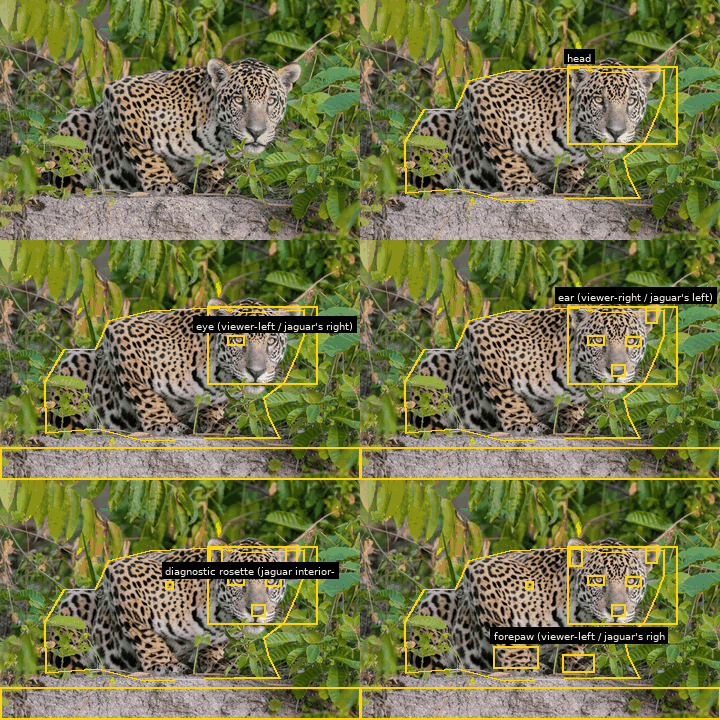
For 20 worked perception sessions on real images — wildlife, art, photography, drawings — see annomate-examples.
What it does
Section titled “What it does”- Serves the VIA image annotator at a localhost URL
- Implements VIA’s push/pull protocol so annotations sync to a local store
- Auto-refreshes the browser when Claude makes changes (no manual pull needed)
- Exposes MCP tools so Claude can read, add, edit, and delete regions
- Optional local-model assistance — open-vocabulary detection (GroundingDINO / YOLO-World), promptable segmentation (SAM 2), VLM verification (Florence-2), scene classification, annotation grading, and free-form Q&A (Qwen2.5-VL)
- Optional format conversion — HEIC / HEIF / AVIF (iPhone photos), PDF pages, EXIF / GPS / camera metadata
- Optional OCR — Tesseract over image regions, returns word-level boxes as detection candidates
Optional features advertise themselves on the MCP tool surface even when their dependencies aren’t installed — they return a structured install hint instead of erroring.
Install
Section titled “Install”The base install is the annotation server alone. Install from GitHub into a dedicated venv:
python -m venv ~/.local/annomate~/.local/annomate/bin/pip install \ 'annomate @ git+https://github.com/caliperhq/annomate.git'Pick the extras you want by appending to the git+ URL:
# Local AI models (~3 GB on disk, lazy-downloaded on first use)pip install 'annomate[ai] @ git+https://github.com/caliperhq/annomate.git'
# Faster detection (YOLO-World, ~95 MB)pip install 'annomate[ai,yolo] @ git+https://github.com/caliperhq/annomate.git'
# Free-form Q&A via chat VLM (Qwen2.5-VL-3B, ~6 GB)pip install 'annomate[ai,chat] @ git+https://github.com/caliperhq/annomate.git'
# Format conversion (HEIC, PDF) + EXIF metadatapip install 'annomate[io] @ git+https://github.com/caliperhq/annomate.git'
# OCR via Tesseractpip install 'annomate[ocr] @ git+https://github.com/caliperhq/annomate.git'
# Everythingpip install 'annomate[ai,yolo,chat,io,ocr] @ git+https://github.com/caliperhq/annomate.git'
The package is not on PyPI — the name annomate there belongs to an unrelated project.
System packages
Section titled “System packages”Several optional features need command-line tools the Python extras can’t install themselves. Install only what you’ll use.
| Feature | Tool | Debian/Ubuntu | macOS | Gentoo | Fedora/RHEL | Arch |
|---|---|---|---|---|---|---|
PDF loading ([io]) | pdftoppm | apt install poppler-utils | brew install poppler | emerge app-text/poppler | dnf install poppler-utils | pacman -S poppler |
OCR ([ocr]) | tesseract | apt install tesseract-ocr | brew install tesseract | emerge app-text/tesseract | dnf install tesseract | pacman -S tesseract |
| OCR language packs | tesseract-<lang> | apt install tesseract-ocr-eng … | brew install tesseract-lang | set LINGUAS="en es …" then re-emerge tesseract | dnf install tesseract-langpack-eng … | pacman -S tesseract-data-eng … |
Rich EXIF ([io]) | exiftool | apt install libimage-exiftool-perl | brew install exiftool | emerge media-libs/exiftool | dnf install perl-Image-ExifTool | pacman -S perl-image-exiftool |
| AI accelerator (optional) | NVIDIA drivers + CUDA | distribution-specific | n/a (use MPS) | emerge nvidia-drivers | dnf install akmod-nvidia | pacman -S nvidia |
HEIC support (pillow-heif) bundles its own libheif; no system package is required.
Claude Code config
Section titled “Claude Code config”Add to your .mcp.json:
{ "mcpServers": { "annomate": { "command": "/path/to/annomate" } }}Find the entry point after install:
which annomate # global/user install~/.local/annomate/bin/annomate # venvannomate # start server (port OS-assigned)annomate --port 9669 # pin the portannomate --browser # open the UI on startupannomate --no-ai # skip the model registry entirelyannomate --models-config FILE # override ~/.config/annomate/models.tomlThe local URL prints to stderr on startup. Open it to use the annotator; load images, draw boxes, then ask Claude about them — or ask Claude to add annotations directly. Changes appear in your browser within a few seconds.
Skills
Section titled “Skills”Install the companion Claude Code skill so Claude knows the annotation workflow, the AI tools, and the trigger-phrase patterns automatically:
cp -r skills/annomate ~/.claude/skills/The skill is split into a small SKILL.md plus sibling reference files (region-encoding, attributes, perception-gotchas, ai-tools, common-patterns) — Claude loads only what’s relevant to a given request.
MCP tools
Section titled “MCP tools”Core (always available)
| Tool | Description |
|---|---|
via_get_annotator_url | Return the local URL of the running VIA UI |
via_add_file | Add an image (or PDF page, via [io]) to the project |
via_get_image / via_get_image_crop | Fetch the image (or a crop) at a target resolution, optionally with the current annotations overlaid |
via_get_project / via_list_files / via_get_annotations | Read the project state |
via_add_region / via_update_region / via_delete_region | Write regions in pixel, returned-pixel, or fraction (0–1) coordinates |
via_update_project / via_save_project | Bulk-load or persist a VIA v3 project JSON |
Local-model assistance — needs [ai]
| Tool | Description |
|---|---|
via_model_status | Report which model adapters are loaded and on which device |
via_suggest_regions | Open-vocabulary detection (GroundingDINO / YOLO-World), excluding existing regions |
via_tighten_region | SAM-derived tight bounding box + IoU score |
via_verify_region | Florence-2 / Qwen-VL crop caption check for generic categories |
via_grade_annotations | CLIP-cosine rubric across the project — flags misplacements and suggests shape encodings |
via_classify_scene | Sub-second CLIP scene class — auto-routes detection to the right pipeline |
via_ask_model | Free-form Q&A against a chat VLM (Qwen2.5-VL-3B) |
via_find_similar | CLIP nearest-neighbour lookup across the project |
IO layer — needs [io] / [ocr]
| Tool | Description |
|---|---|
via_load_document | Rasterize PDF pages and add them as images |
via_read_metadata | EXIF / GPS / camera metadata — catches a class of priors before they’re placed |
via_run_ocr | Tesseract over image regions, returning word-level boxes as detection candidates |
Why a third voice
Section titled “Why a third voice”annomate is built around a three-voice loop. The model proposes regions; the user reviews in the browser at full resolution; the local-model layer adds a pixel-statistics verdict between the two. Each voice catches what the others miss:
| Voice | What it knows | How it speaks |
|---|---|---|
| Claude | Cultural priors, language, whole-image gestalt | Boxes, polygons, polylines, circles; evidence-based labels |
Local model ([ai]) | Pixel statistics, SAM masks, CLIP embeddings, VLM captions | Suggests candidates, tightens boxes, verifies labels, grades placements |
| User | Image at full resolution + actual knowledge of the subject | Adjudicates, corrects, deletes |
Essays
Section titled “Essays”How it pairs with jscad-mcp
Section titled “How it pairs with jscad-mcp”| Loop | Origin of the artifact | Forcing function | What gets exposed |
|---|---|---|---|
jscad-mcp | Claude wrote it | Render and look | Code-vs-intent mismatch |
annomate | Someone else made it | Commit coordinates and look | Prior-vs-reality mismatch |
Both tools refuse to let the model get away with sounding right.
- Source: github.com/caliperhq/annomate
- License: MIT (VIA included under BSD 2-Clause — see NOTICE; the optional YOLOE adapter is upstream AGPL-3.0)